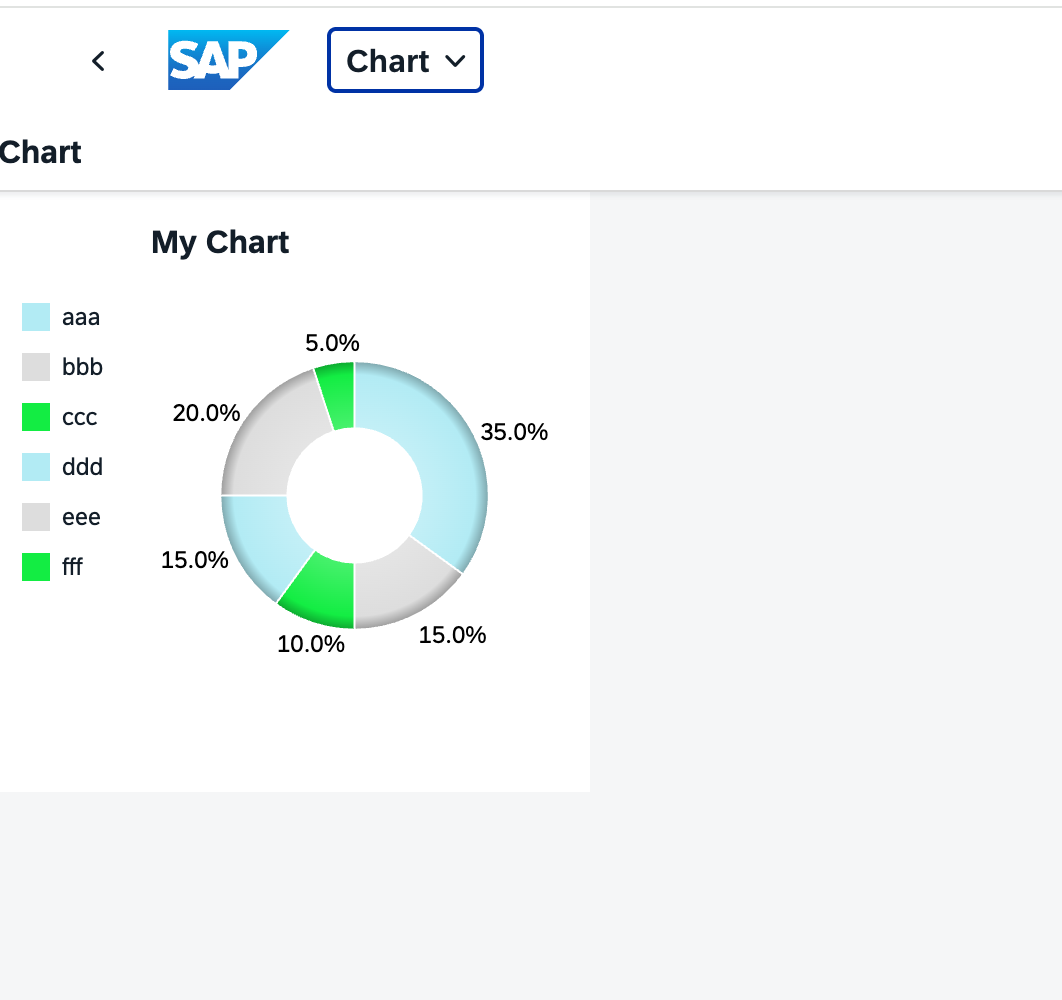
View에서 Chart 구성하기
<mvc:View controllerName="ycl2project11.controller.Main"
    xmlns:mvc="sap.ui.core.mvc"
    xmlns:viz="sap.viz.ui5.controls"
    xmlns:viz.feeds="sap.viz.ui5.controls.common.feeds"
    xmlns:viz.data="sap.viz.ui5.data"
    xmlns="sap.m">
    <Page id="page" title="{i18n>title}">
        <viz:VizFrame id="idViewChart" width="300px" height="300px"
                    vizType="donut"
                    uiConfig="{'applicationSet' : 'fiori'}"
                    vizProperties="{
                        title : { visible : true, text : 'My Chart', alignment: 'left' },
                        legendGroup: { layout: { position: 'left' } },
                        plotArea : {
                            drawingEffect: 'glossy',
                            dataLabel: { visible: true },
                            colorPalette: ['#B2EBF4','#dddddd','#13ed43']
                        }
                    }">
            <viz:dataset>
                <viz.data:FlattenedDataset data="{view>/list}">
                    <!--x축-->
                    <viz.data:dimensions>
                        <viz.data:DimensionDefinition name="이름" value="{view>name}"/>
                    </viz.data:dimensions>
                    <!--y축-->
                    <viz.data:measures>
                        <viz.data:MeasureDefinition name="숫자" value="{view>rate}"/>
                    </viz.data:measures>
                </viz.data:FlattenedDataset>
            </viz:dataset>

            <viz:feeds>
            <!-- 보통 막대차트나 라인차트 같은 경우 -> CategoryAxis/valueAxis
                 도넛차트나 파이차트 같은 경우 -> color/size
            -->
                <viz.feeds:FeedItem uid="color" type="Dimension" values="이름" />
                <viz.feeds:FeedItem uid="size" type="Measure" values="숫자" />
            </viz:feeds>

        </viz:VizFrame>

    </Page>
</mvc:View>
sap.ui.define([
    "sap/ui/core/mvc/Controller",
    "sap/ui/model/json/JSONModel",
    "sap/viz/ui5/data/FlattenedDataset",
    "sap/viz/ui5/controls/common/feeds/FeedItem"
], (Controller, JSONModel, FlattenedDataset,FeedItem) => {
    "use strict";

    return Controller.extend("ycl2project11.controller.Main", {
        onInit() {
            let oData = {
                list : [
                    {name: "aaa", rate: "35", cost: "15"},
                    {name: "bbb", rate: "15", cost: "10"},
                    {name: "ccc", rate: "10", cost: "11"},
                    {name: "ddd", rate: "15", cost: "15"},
                    {name: "eee", rate: "20", cost: "12"},
                    {name: "fff", rate: "5", cost: "10"},
                ]
            };
            this.getView().setModel(new JSONModel(oData), "view");

            let oData_controller = {
                sales : [
                    { product : "Jackets", amount : "65" },
                    { product : "Shirts", amount : "70" },
                    { product : "Pants", amount : "86" },
                    { product : "Coats", amount : "92" },
                    { product : "Purse", amount : "77" },
                ]
            };
            this.getView().setModel(new JSONModel(oData_controller), "cont");
        },
    });
});
Controller에서 Chart 구성하기
<mvc:View controllerName="ycl2project11.controller.Main"
    xmlns:mvc="sap.ui.core.mvc"
    xmlns:viz="sap.viz.ui5.controls"
    xmlns:viz.feeds="sap.viz.ui5.controls.common.feeds"
    xmlns:viz.data="sap.viz.ui5.data"
    xmlns="sap.m">
    <Page id="page" title="{i18n>title}">
        <viz:VizFrame id="idControllerChart">

        </viz:VizFrame>
    </Page>
</mvc:View>
sap.ui.define([
    "sap/ui/core/mvc/Controller",
    "sap/ui/model/json/JSONModel",
    "sap/viz/ui5/data/FlattenedDataset",
    "sap/viz/ui5/controls/common/feeds/FeedItem"
], (Controller, JSONModel, FlattenedDataset,FeedItem) => {
    "use strict";

    return Controller.extend("ycl2project11.controller.Main", {
        onInit() {
            let oData_controller = {
                sales : [
                    { product : "Jackets", amount : 65 },
                    { product : "Shirts", amount : 70 },
                    { product : "Pants", amount : 86 },
                    { product : "Coats", amount : 92 },
                    { product : "Purse", amount : 77 },
                ]
            };
            this.getView().setModel(new JSONModel(oData_controller), "cont");

            this._setChartController();
        },
        _setChartController: function () {
            let oChart = this.byId("idControllerChart");

            // dataset 만들기
            let oDataSet = new FlattenedDataset({
                dimensions: [{ name: "Product", value: "{cont>product}" }],
                measures: [{ name: "Amount", value: "{cont>amount}" }],
                data: { path : "cont>sales" }
            });
            oChart.setDataset(oDataSet);
            //feedItem 구성

            let feedValueAxis = new FeedItem({
                uid:"valueAxis",
                type:"Measure",
                values: ["Amount"]
            });

            let feedCategoryAxis = new FeedItem({
                uid:"categoryAxis",
                type:"Dimension",
                values: ["Product"]
            });

            oChart.addFeed(feedValueAxis);
            oChart.addFeed(feedCategoryAxis);

            oChart.setVizProperties({
                title: {visible : true , text :'막대차트'}
            });

            // oChart.setVizType('line');
        }
    });
});