-
[RAP] #4 CDS View 추가 문법 (1)SAP/RAP 2026. 2. 25. 21:25
산술 연산(ABAP SQL vs CDS)
ABAP SQL과 CDS View 모두에서 산술 연산을 사용하여 계산된 필드를 생성할 수 있다.
1. Code Pushdown을 적용한 ABAP SQL
SELECT FROM /dmo/flight
       FIELDS carrier_id,
              connection_id,
              flight_date,
              seats_max - seats_occupied AS seats_free,
              ...
       INTO TABLE @DATA(lt_flights).
※ Code Pushdown
데이터 처리를 ABAP 서버가 아니라 Database(HANA)에서 수행하도록 "코드를 내려보내는 것"
2. CDS View에서 계산식 사용
CDS Data Definition
define view entity ZS4D430_SQL_Logic
  as select from /dmo/flight
{
  key carrier_id,

      seats_max - seats_occupied as seats_free,
      ...
}
ABAP에서 CDS 조회
SELECT FROM ZS4D430_SQL_Logic
       FIELDS carrier_id,
              seats_free,     -- CDS에서 계산한 필드
              ...
       INTO TABLE @DATA(result).
이러한 SQL 로직을 사용하면 다음과 같은 이점이 있다.
- 캡슐화 : 계산 로직을 CDS 안에 숨긴다.
- 재사용성
- 의미부여 : 계산 결과에 이름을 붙일 수 있다.
- 권한부여 : 권한 제어 가능
3. 산술 표현식의 규칙과 제한
산술 연산자
- 더하기(+), 빼기(-), 곱하기(*), 나누기(/)를 지원
표현식의 종류 및 특징
- Integer Expression : 정수만 사용 가능
- Decimal Expression : 소수점과 정수를 혼합하여 사용 가능
- Floating Point Expression : FLTP 및 f 타입만 사용 가능
중요한 제한 사항
- 나누기(/) 연산자: Floating Point 타입에서만 사용 가능
- 타입 혼합 금지: Floating Point 와 Integer / Decimal 혼합 사용 불가
리터럴
코드에 직접 작성하는 고정된 값이다.
DATA lv_num TYPE i VALUE 10.여기서 10 → 리터럴
ABAP에서 지원하는 리터럴 종류
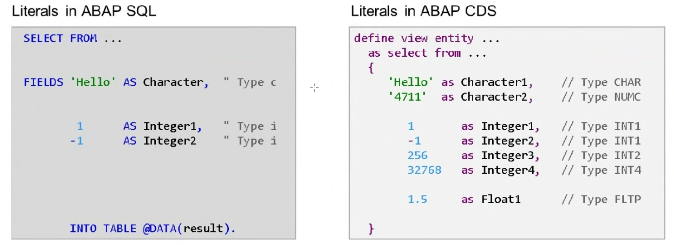
ABAP SQL의 리터럴
- 문자(C)
- 정수(I)
ABAP CDS의 리터럴
- 문자(CHAR)
- 문자형 숫자(NUMC)
- 정수(INT1,INT2, INT4)
- 실수(FLTP)
※ ABAP에서 실수(Floating Point) 리터럴 지원하지 않는 이유 → ABAP 문법 구조 때문
ABAP은 문장의 끝을 . 으로 구분함
만약 실수 리터럴 허용하면 실수의 소수점인지 문장의 끝인지 구분 불가능
그래서 SAP가 실수 리터럴 지원 안함
CAST
데이터 타입을 다른 타입으로 변환하는 기능
define view entity Zs4d430_Sql02_Cast
  as select from /dmo/flight
{
  '19891109'                         as numc8,
  cast( '19891109' as abap.char(8) ) as char8,

  cast( '19891109' as abap.int4    ) as int4,
  cast( '19891109' as abap.dec(10,2) ) as dec10_2,
  cast( '19891109' as abap.fltp    ) as fltp,

  cast( '19891109' as abap.dats    ) as dats
}
엘리먼트 타입으로도 캐스팅 가능하며, 데이터 엘리먼트의 라벨까지도 적용이 된다.
즉, 단순 타입 변환이 아니라 Semantic(의미)도 적용됨
define view entity ZS4D430_Element_Cast
  as select from /dmo/flight
{
  cast( '19891109' as /dmo/flight_date ) as fldate,

  cast( '19891109' as /dmo/travel_id preserving type ) as travelid
}
※ preserving type 옵션
기술적 타입은 유지하면서 데이터 엘리먼트의 의미(Semantic)만 부여할 때 사용한다.
동일한 타입을 캐스팅 하려고 할 때 경고메시지가 나오는데 경고 메시지를 없애기 위해 사용하는 키워드
‘19891109’ → numc8
/deo/travel_id → numc8
타입만 보면 동일함.


나누기(/) 연산자 사용 시 FLTP Cast 필요
SELECT FROM /dmo/flight
       FIELDS ...
              seats_max - seats_occupied AS seats_available,

              /* 백분율 계산: 나누기(/)를 위해 모든 피연산자를 FLTP로 캐스팅 */
              ( CAST( seats_occupied AS FLTP )
                * CAST( 100 AS FLTP )
              ) / CAST( seats_max AS FLTP ) AS percentage_fltp
       ...
define view entity ZS4D430_Arithmetic as select from /dmo/flight { seats_max - seats_occupied as seats_available, /* 백분율 계산: 나누기(/) 연산자는 오직 FLTP 표현식에서만 사용 가능 */ ( cast( seats_occupied as abap.fltp ) * 100.0 ) / cast( seats_max as abap.fltp ) as percentage_fltp }
case문
1. Simple CASE Distinction
- 하나의 필드 값을 기준으로 비교
- ABAP CASE 문과 동일
case custtype
  when 'P' then 'Private Customer'
  when 'B' then 'Business Customer'
  else ' '
end as Cust_Text,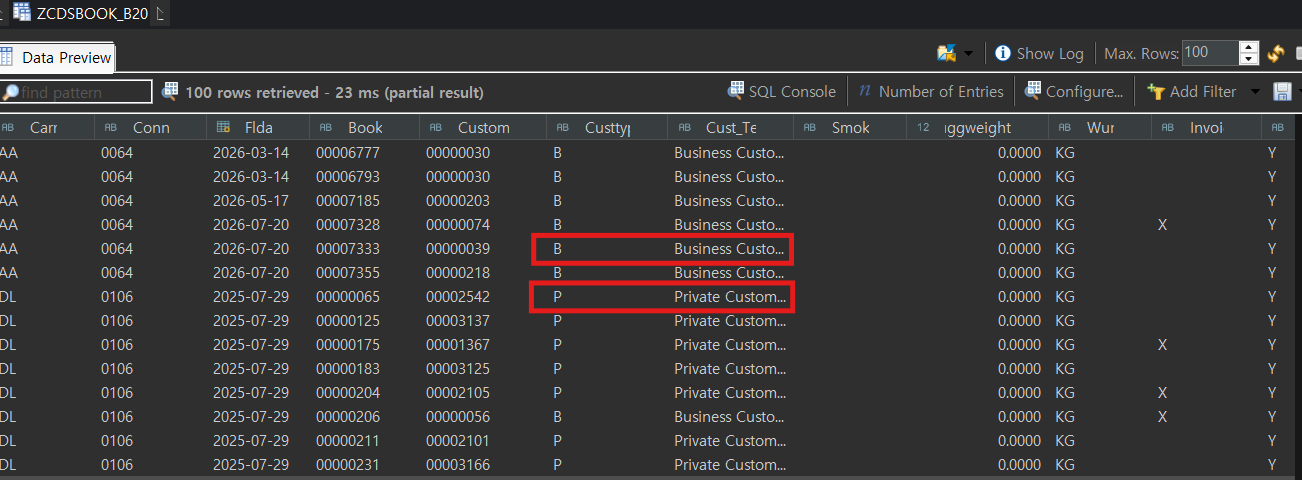
2. Complex CASE Distinction- 조건식을 사용
- ABAP IF 문과 동일
case
   when luggweight < 25 then 'B'
   when luggweight >= 25 and luggweight < 40 then 'A'
   else ' '
end as Lugg_State,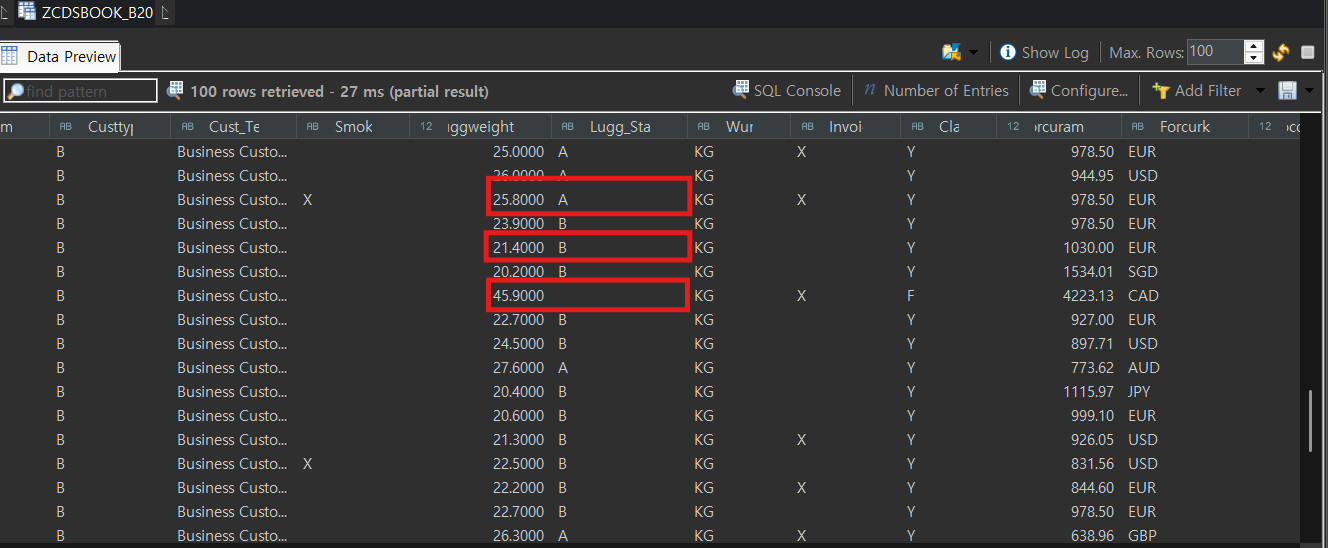
3. Nested CASE (중첩 CASE)
- CASE 안에 CASE 사용
- 복잡한 조건 처리
case
  when class != 'F' then
  case when wunit = 'KG' and luggweight > 20 then 'X'
       when wunit = 'LB' and luggweight > 40 then 'X'
  end
end as Complex_unit,
CDS Association 호출
@AbapCatalog.sqlViewName: 'ZCDSFLIT2_B20_S'
@AbapCatalog.compiler.compareFilter: true
@AbapCatalog.preserveKey: true
@AccessControl.authorizationCheck: #NOT_REQUIRED
@EndUserText.label: 'Flight CDS View 2'
@Metadata.ignorePropagatedAnnotations: true
@OData.publish: true
@OData.entitySet.name: 'Flights'
define view zcdsflight2_b20 as select from sflight
    association to zcdsscarr2_b20 as _Scarr
        on sflight.carrid = _Scarr.Carrid
{
    key carrid as Carrid,
    key connid as Connid,
    key fldate as Fldate,

    @Semantics.amount.currencyCode : 'Currency'
    @EndUserText.label: 'myPrice'
    price as Price,

    @Semantics.currencyCode: true
    currency as Currency,

    planetype as Planetype,
    seatsmax as Seatsmax,
    seatsocc as Seatsocc,

    @Semantics.amount.currencyCode : 'Currency'
    paymentsum as Paymentsum,

    seatsmax_b as SeatsmaxB,
    seatsocc_b as SeatsoccB,
    seatsmax_f as SeatsmaxF,
    seatsocc_f as SeatsoccF,

    _Scarr
}
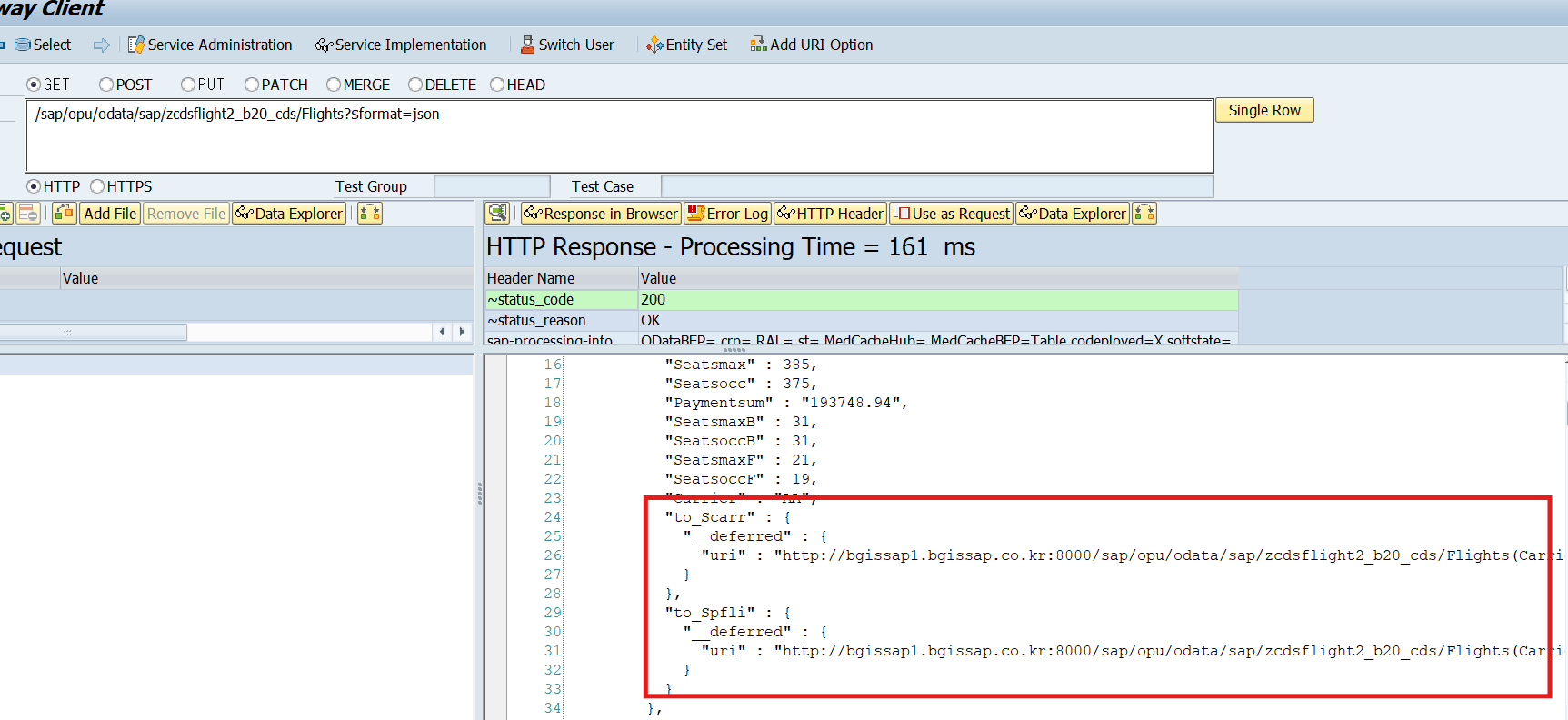
$expand로 요청시

Association 안의 Association 호출 (Nested Association)
Association 안에 정의된 Association을 다시 호출하는 것
즉, CDS View 간의 관계를 단계적으로 연결하여 데이터 모델을 확장하는 방식
프로그램의 구조
SFLIGHT
  ↓ Association
SCARR
  ↓ Association
SPFLI
즉, SFLIGHT CDS View에서 SCARR CDS View를 연결하고,
그 SCARR CDS View 안에 있는 SPFLI Association까지 호출하는 구조예제 코드
@AbapCatalog.sqlViewName: 'ZCDSFLIT2_B20_S'
@AbapCatalog.compiler.compareFilter: true
@AbapCatalog.preserveKey: true
@AccessControl.authorizationCheck: #NOT_REQUIRED
@EndUserText.label: 'Flight CDS View 2'
@Metadata.ignorePropagatedAnnotations: true
@OData.publish: true
@OData.entitySet.name: 'Flights'
define view zcdsflight2_b20 as select from sflight
    association to zcdsscarr2_b20 as _Scarr
        on sflight.carrid = _Scarr.Carrid
{
    key carrid as Carrid,
    key connid as Connid,
    key fldate as Fldate,

    @Semantics.amount.currencyCode : 'Currency'
    @EndUserText.label: 'myPrice'
    price as Price,

    @Semantics.currencyCode: true
    currency as Currency,

    planetype as Planetype,
    seatsmax as Seatsmax,
    seatsocc as Seatsocc,

    @Semantics.amount.currencyCode : 'Currency'
    paymentsum as Paymentsum,

    seatsmax_b as SeatsmaxB,
    seatsocc_b as SeatsoccB,
    seatsmax_f as SeatsmaxF,
    seatsocc_f as SeatsoccF,

    _Scarr,

    // 경로표현식은 내부 조인이 일어나므로, 조인에 필요한 필드가 선언되어 있어야함
    // 따라서 _spfli 연결 시 사용되는 _Scarr.CarrId를 별도 선언함
    _Scarr.Carrid as Carrier,
    _Scarr._spfli as _Spfli // _Scarr 안에 있는 association _spfli 호출
}
'SAP > RAP' 카테고리의 다른 글
[RAP] #7 Annotation 정리 (1) 2026.03.03 [RAP] #6 RAP (0) 2026.03.01 [RAP] #5 CDS View 추가 문법 (2) (0) 2026.02.26 [RAP] #2 CDS View (0) 2026.02.22 [RAP] #1 ADT- ABAP Development Tools (0) 2026.02.21