-
[RAP] #8 RAP Header-Item 구조의 UI 구성SAP/RAP 2026. 3. 3. 22:26
Metadata Extension 파일을 활용하여 Object Page(Item Page) 구성하기

1. Header Metadata Extension 파일에서 Header UI 구성 (List Report Page)
- Object Page 구조는 Header View에서 만든다
... annotate view ZSFLIGHT_CR_B20 with { // @UI.facet을 통해 Object page 세팅 @UI.facet: [ { id: 'SflightHeader', purpose: #STANDARD, // 일반 Object Page 섹션 type: #IDENTIFICATION_REFERENCE, targetQualifier: 'HeaderInfo', // 어떤 Annotation 그룹을 이 facet에 연결할지 지정하는 옵션 label: 'Header Info', position: 10 }, { id: 'Booking', purpose: #STANDARD, type: #LINEITEM_REFERENCE, label: 'Book', position: 20, targetElement: '_Item' // Association 이름 } ] @UI:{ lineItem: [{ position: 10, label: '항공사' }], selectionField: [{ position: 10 }] } @UI.identification: [{ qualifier: 'HeaderInfo', position: 10 }] Carrid; ... }- @UI.facet : 섹션 생성 (해당 어노테이션은 필드에 붙지 않고 단독으로 사용)
- type : #IDENTIFICATION_REFERENCE - 현재 엔티티의 필드들을 보여주는 섹션 (단일 객체 정보 표시)
#LINEITEM_REFERENCE - Association으로 연결된 Child 엔티티의 테이블을 보여주는 섹션
- type : #IDENTIFICATION_REFERENCE - 현재 엔티티의 필드들을 보여주는 섹션 (단일 객체 정보 표시)
[항공편 정보] IDENTIFICATION 항공사 : LH 편명 : 0400 날짜 : 2024-01-01 ------------------------ [Book] LINEITEM | Carrid | Connid | Bookid | ... | | LH | 0400 | 001 | ... | | LH | 0400 | 002 | ... |- @UI.identification : 현재 엔티티의 상세 정보를 Form 형태로 표시
2. Item Metadata Extension 파일에서 Object Page 안의 테이블 컬럼 정의
@Metadata.layer: #CORE
annotate view ZSBOOK_C_B20
    with
{
    @UI.lineItem: [{ position: 10 }]
    Carrid;
    @UI.lineItem: [{ position: 20 }]
    Connid;
    @UI.lineItem: [{ position: 30 }]
    Fldate;
    @UI.lineItem: [{ position: 40 }]
    Bookid;
    @UI.lineItem: [{ position: 50 }]
    Customid;
    @UI.lineItem: [{ position: 60 }]
    Custtype;
    ...

}
Object Page 상단 Header 영역 구성

Header Metadata Extension 파일
... annotate view ZSFLIGHT_CR_B20 with { // @UI.facet을 통해 Object page 세팅 @UI.facet: [ { // id: 'SflightMainHeader', purpose: #HEADER, // Object Page 상단 Header 영역 type: #FIELDGROUP_REFERENCE, // FieldGroup을 참조 targetQualifier: 'HeaderFG', // 어떤 FieldGroup을 연결할지 지정 label: 'Header Info', position: 10 } ] @UI:{ ..., fieldGroup: [ { qualifier: 'HeaderFG', label: 'Carrier', position: 10 } ] } Carrid; @UI:{ ..., fieldGroup: [ { qualifier: 'HeaderFG', label: 'Connection', position: 20 } ] } Connid; @UI:{ ..., fieldGroup: [ { qualifier: 'HeaderFG', label: 'Flight Date', position: 30 } ] } Fldate;- FIELDGROUP_REFERENCE : 여러 필드를 하나의 그룹(Form 블록)으로 묶어 표시하는 방식
- @UI.fieldGroup : 특정 그룹에 필드 삽입
- @UI.fieldGroup + #HEADER → 구조화된 Header
Object Page Body 영역에서 Identification Section 구성
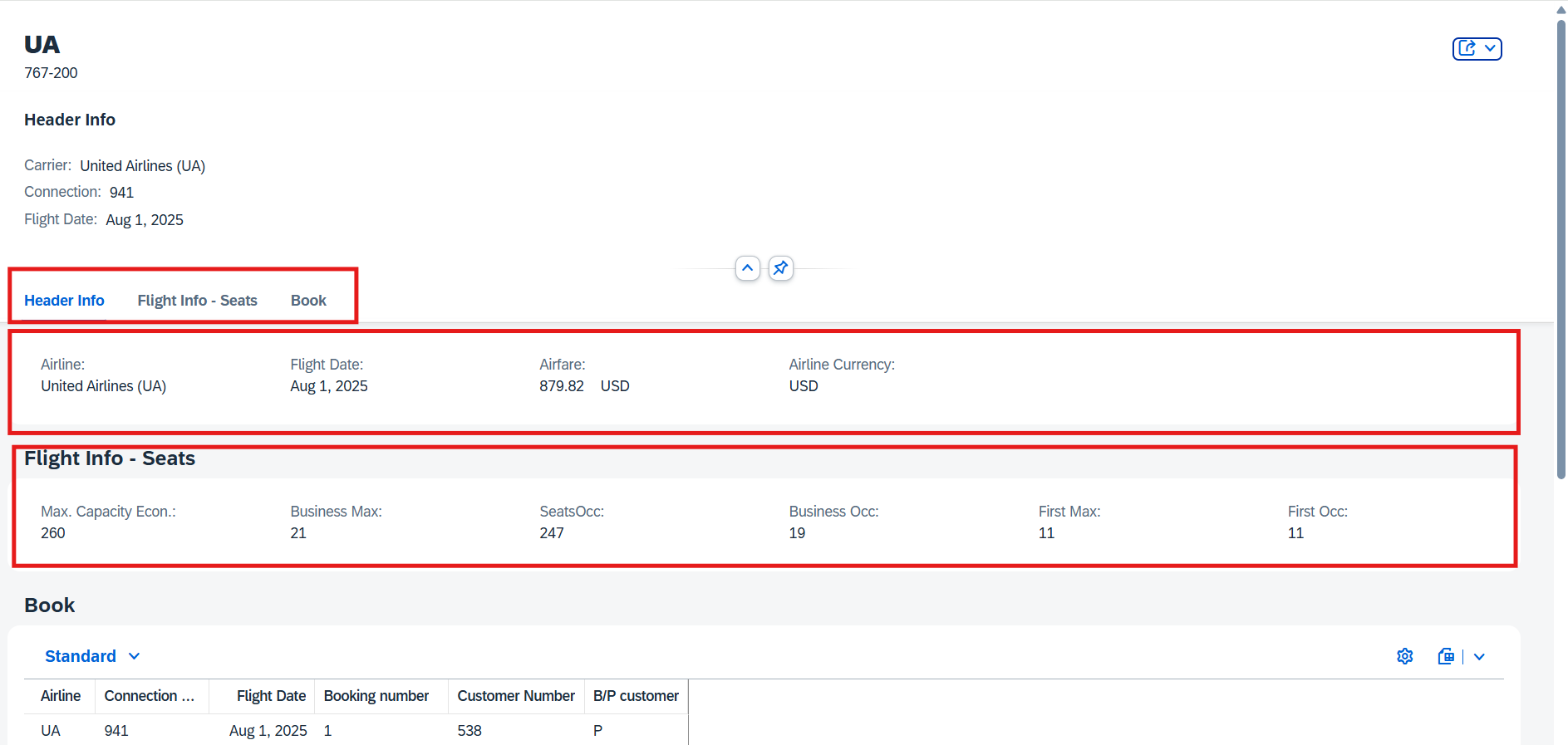
...
annotate view ZSFLIGHT_CR_B20
    with
{
    // @UI.facet을 통해 Object page 세팅
    @UI.facet: [
        ...,
        {
            id: 'SflightHeader',
            purpose: #STANDARD,
            type: #IDENTIFICATION_REFERENCE,
            targetQualifier: 'Identification1',
            label: 'Header Info',
            position: 10
        },
        {
            id: 'SflightHeader_seasts',
            purpose: #STANDARD,
            type: #IDENTIFICATION_REFERENCE,
            targetQualifier: 'Identification2',
            label: 'Flight Info - Seats',
            position: 20
        },
        ...
    ]

    // Identification1
    @UI.identification: [ { qualifier: 'Identification1', position: 10 } ]
    Carrid;
    @UI.identification: [{ qualifier: 'Identification1', position: 30 }]
    Fldate;
    @UI.identification: [{ qualifier: 'Identification1', position: 40 }]
    Price;
    @UI.identification: [{ qualifier: 'Identification1', position: 50}]
    Currency;

    // Identification2
    @UI.identification: [ { qualifier: 'Identification2', position: 10 } ]
    Seatsmax;
    @UI.identification: [{ qualifier: 'Identification2', position: 30, label: 'SeatsOcc' }]
    Seatsocc;
    @UI.identification: [{ qualifier: 'Identification2', position: 30, label: 'Business Max' }]
    SeatsmaxB;
    @UI.identification: [{ qualifier: 'Identification2', position: 40, label: 'Business Occ' }]
    SeatsoccB;
    @UI.identification: [{ qualifier: 'Identification2', position: 50, label: 'First Max' }]
    SeatsmaxF;
    @UI.identification: [{ qualifier: 'Identification2', position: 60, label: 'First Occ' }]
    SeatsoccF;
}
텍스트 색상 처리 및 아이콘
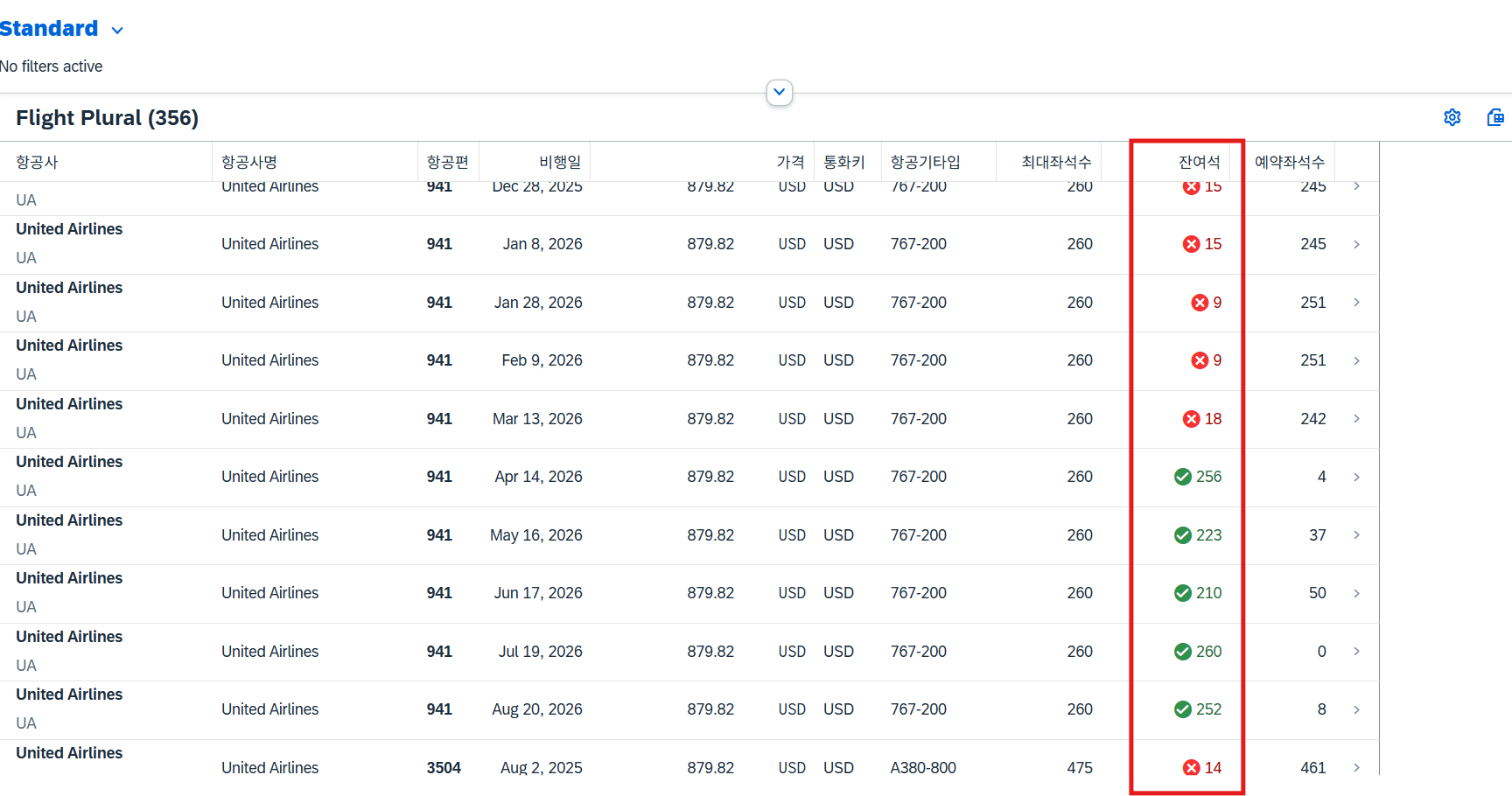
1. Interface View
@AccessControl.authorizationCheck: #NOT_REQUIRED
@EndUserText.label: 'Interface View(root)'
@Metadata.ignorePropagatedAnnotations: true
define root view entity ZSFLIGHT_IR_B20 as select from sflight as sf
    composition[0..*] of ZSBOOK_I_B20 as _Item
    association to scarr as _Scarr
    on $projection.Carrid = _Scarr.carrid

{
    ...
    seatsmax as Seatsmax,
    seatsocc as Seatsocc,
    seatsmax - seatsocc as Seatsremain,
    case
        when $projection.Seatsremain > 50 then 3  // green
        when $projection.Seatsremain > 20 then 2  // yellow
        when $projection.Seatsremain > 0 then 1   // red
        else 0 // unknown
    end as SeatsremainCriticality, // 색상코드 필드
   ...
}
2. Projection View
...
define root view entity ZSFLIGHT_CR_B20
    as projection on ZSFLIGHT_IR_B20
{
    ...
    Seatsremain, // 남은 좌석수 필드 추가
    SeatsremainCriticality, // 남은 좌석수 필드에 따른 색상코드 필드 추가
    ...
}
3. Metadata Extension
...
annotate view ZSFLIGHT_CR_B20
    with
{
    ...
    @UI:{
        lineItem: [{
            position: 90, label: '잔여석',
            criticality: 'SeatsremainCriticality',    // 색상을 결정할 필드 지정
            criticalityRepresentation: #WITHOUT_ICON  // 아이콘 없이 색상만
        }]
    }
    Seatsremain;
}
Object Page Header 영역에서 Criticality/Datapoint 구성
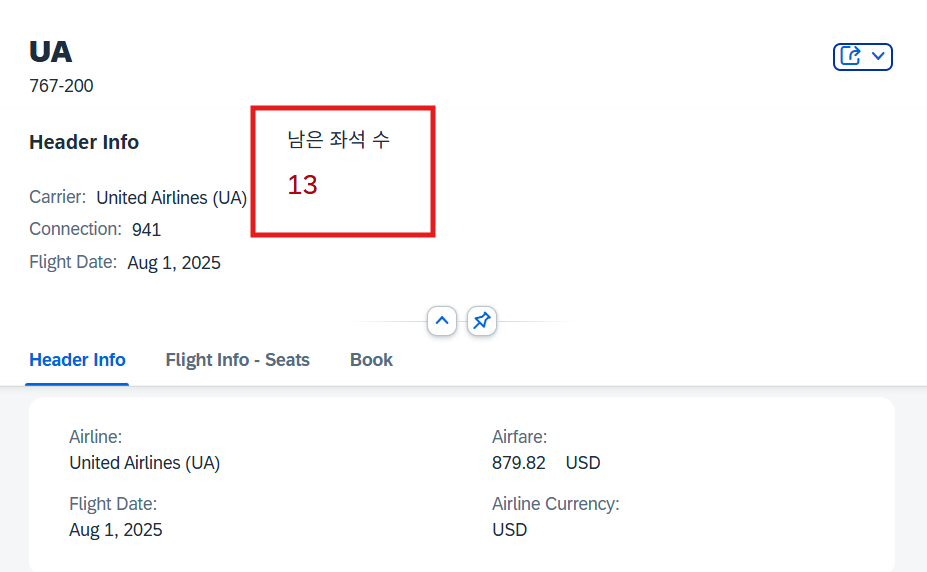
... annotate view ZSFLIGHT_CR_B20 with { @UI.facet: [ { id: 'SflightSeatsRemain', purpose: #HEADER, type : #DATAPOINT_REFERENCE, // 데이터 포인트(KPI) 표시 targetQualifier: 'HeaderState', position: 20 } ] @UI:{ lineItem: [{ position: 90, label: '잔여석', criticality: 'SeatsremainCriticality', criticalityRepresentation: #WITHOUT_ICON }], identification: [{ qualifier: 'Identification2', position: 70, label: '잔여석'}], dataPoint: { title: '남은 좌석 수', qualifier: 'HeaderState', criticality: 'SeatsremainCriticality' // 색상/상태 기준 필드 } } Seatsremain; }- @UI.dataPoint : Object Page Header 또는 KPI 카드에 표시되는 핵심 상태 값
Object Page Header 영역에서 차트 구성

1. Interface View
@AccessControl.authorizationCheck: #NOT_REQUIRED
@EndUserText.label: 'Interface View(root)'
@Metadata.ignorePropagatedAnnotations: true
define root view entity ZSFLIGHT_IR_B20 as select from sflight as sf
    composition[0..*] of ZSBOOK_I_B20 as _Item
    association to scarr as _Scarr
    on $projection.Carrid = _Scarr.carrid

{
	...
    cast(
        cast(seatsocc as abap.fltp) / cast(seatsmax as abap.fltp) * 100.0 as abap.dec(15, 2)
    ) as Percentage,
    case
        when $projection.Percentage = 100 then 3  // green
        when $projection.Percentage > 50 then 2  // yellow
        when $projection.Percentage > 0 then 1   // red
        else 0 // unknown
    end as PercentageCriticality, // 색상코드 필드


}
2. Projection View
...
define root view entity ZSFLIGHT_CR_B20
    as projection on ZSFLIGHT_IR_B20
{
    ...
    Percentage, // 예약율 필드 추가
    PercentageCriticality, // 예약율에 따른 색상코드 필드 추가
    ...
}
3. Metadata Extension
...
annotate view ZSFLIGHT_CR_B20
    with
{

   @UI.facet: [
        {
            id: 'SflightPercentage',
            purpose: #HEADER,
            type : #DATAPOINT_REFERENCE, // 데이터 포인트(KPI) 표시
            targetQualifier: 'HeaderPercent',
            position: 30
        }
    ]

    @UI.lineItem: [{
        position: 100,
        label: '예약율(%)',
        type: #AS_DATAPOINT // DataPoint 형태 지정
    }]
    @UI.dataPoint: {
        title: '예약율 (%)',
        description: '좌석수를 이용해 계산한 결과값',
        qualifier: 'HeaderPercent',
        visualization: #PROGRESS, // Progress Bar
        targetValue: 100,  // 최대 값 기준
        criticality: 'PercentageCriticality' // 색상제어 ( 1:Red, 2: Yellow, 3:Green )
    }
    Percentage;

}
테이블 컬럼 영역에서 차트 구성
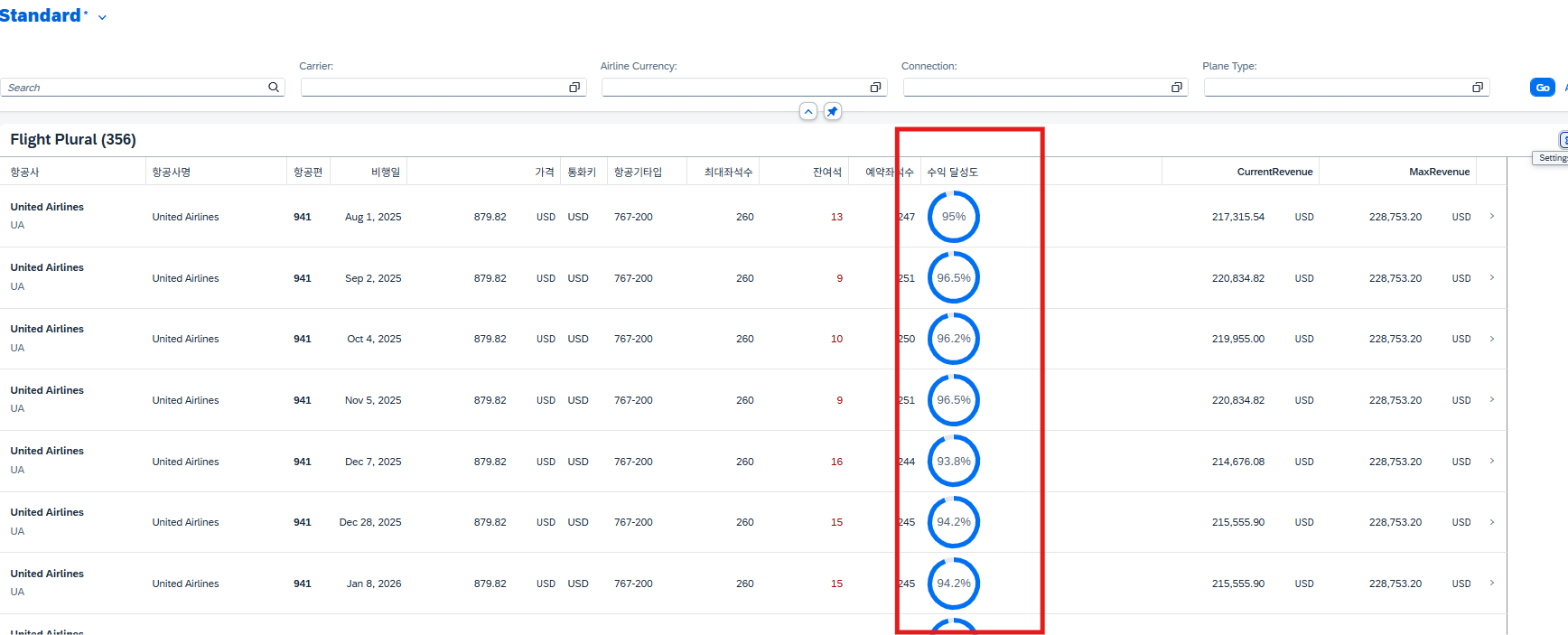
1. Interface View
@AccessControl.authorizationCheck: #NOT_REQUIRED
@EndUserText.label: 'Interface View(root)'
@Metadata.ignorePropagatedAnnotations: true
define root view entity ZSFLIGHT_IR_B20 as select from sflight as sf
    composition[0..*] of ZSBOOK_I_B20 as _Item
    association to scarr as _Scarr
    on $projection.Carrid = _Scarr.carrid

{
    ...
    // 1. 현재 총 수익 (예약석 * 단가)
    @Aggregation.default: #SUM // UI상에서 동적 합계 적용
    @Semantics.amount.currencyCode: 'Currency'
    cast(
        cast( price as abap.fltp ) * cast( seatsocc as abap.fltp ) as abap.dec(15,2)
    ) as CurrentRevenue,
    case
        when $projection.CurrentRevenue > 95 then 3 // green
        when $projection.CurrentRevenue > 20 then 2 // yellow
        when $projection.CurrentRevenue > 10 then 1 // red
        else 0 // unknown
      end as RevenueCriticality, // 색상코드 필드

    // 2. 최대 잠재 수익 (전체 좌석수 * 단가)
    @Aggregation.default: #SUM // UI상에서 동적 합계 적용
    @Semantics.amount.currencyCode: 'Currency'
    cast(
        cast( price as abap.fltp ) * cast( seatsmax as abap.fltp ) as abap.dec(15,2)
    ) as MaxRevenue,
   ...
}
2. Projection View
...
define root view entity ZSFLIGHT_CR_B20
    as projection on ZSFLIGHT_IR_B20
{
    ...
    CurrentRevenue, // (예약수에 따른) 현재 수익
    RevenueCriticality,
    MaxRevenue, // (만석시) 총 수익
    ...
}
3. Metadata Extension
... @UI.chart: [ { qualifier: 'RevenueChart', title: '수익 현황', chartType: #DONUT, measures: [ 'CurrentRevenue' ], //현재 수익 measureAttributes: [ { measure: 'CurrentRevenue', // 차트에 표시될 데이터 필드 asDataPoint: true // DataPoint 설정을 사용하겠다. } ] } ] annotate view ZSFLIGHT_CR_B20 with { @UI.lineItem:[{ position: 110, type: #AS_CHART, // Projection View 테이블 컬럼에 차트 표시 label: '수익 달성도', valueQualifier: 'RevenueChart' }] @UI.dataPoint: { targetValueElement: 'MaxRevenue', // 목표값 forecastValue: 'CurrentRevenue' // 현재값 //criticality : 'RevenueCriticality' 색상제어 가능 } CurrentRevenue; }- @Aggregation.default: #SUM → Fiori UI에서 테이블 컬럼 합계 표시 가능
'SAP > RAP' 카테고리의 다른 글
[RAP] #7 Annotation 정리 (1) 2026.03.03 [RAP] #6 RAP (0) 2026.03.01 [RAP] #5 CDS View 추가 문법 (2) (0) 2026.02.26 [RAP] #4 CDS View 추가 문법 (1) (0) 2026.02.25 [RAP] #2 CDS View (0) 2026.02.22